01 Policy questions
Policy answers name their source.
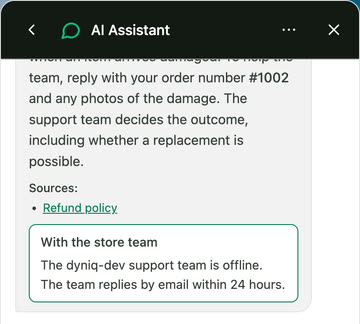
Dyniq answers from the policies you give it, and shows the policies it used.
AI support for Shopify stores
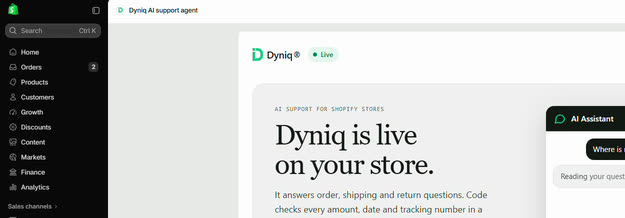
Dyniq® answers order, return and policy questions from your own store data. The hard ones come to you on WhatsApp.
No shopper sees a reply until you press Go live.
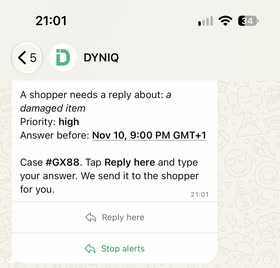
The hand-off
When a shopper needs a person, you get the case on your phone. Your reply goes to the shopper by email and shows in the chat.
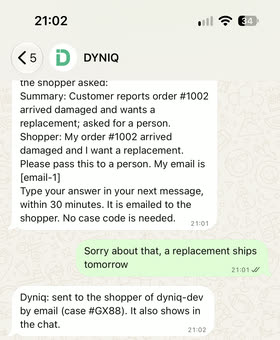
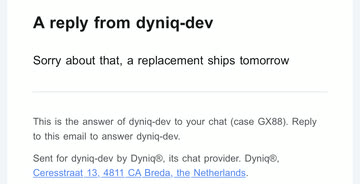

Screens from our test store, with invented data.
How it works
01 Policy questions
Dyniq answers from the policies you give it, and shows the policies it used.
02 Hard cases
Dyniq tells the shopper what your policy says and what to send, then passes the case to your team. It is built not to promise a refund your policy does not give, and your team decides the outcome.
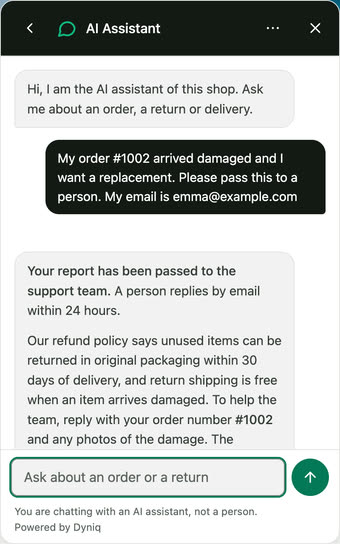
03 Go live
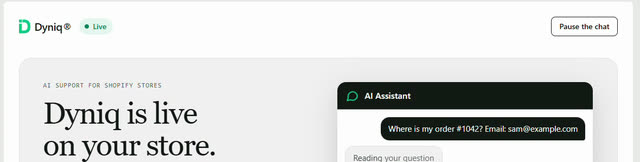
Preview Dyniq in your Shopify admin. No shopper sees a reply until you press Go live, and one click pauses the chat.
04 Order data
Once your orders are connected, Dyniq shows an order only when the order number and the email address match.
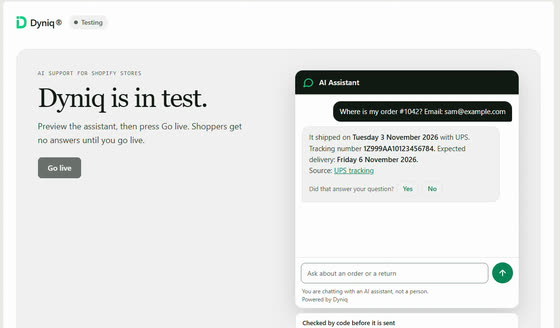
No shopper sees a reply until you press Go live.
Screens from our test store, with invented data.
Your hours and the price
Move the sliders. Nothing you type leaves this page.
Customer questions that reach you. Fair use is 1,000 conversations every 30 days.
Read it, look it up, type the answer, send it.
Set your own: your hourly cost, or what an hour of your time is worth.
What a full-time VA abroad costs you each month.
Equals about USD 9.38 an hour at 160 hours a month.
Rose Talent Solutions says offshore agencies typically price between USD 1,200 and 2,200 a month for a full-time Shopify VA (Rose Talent Solutions, 2026 (opens in a new tab)). The USD 1,500 start value sits inside that range. Your VA may cost less.
Dyniq answers repeat shopper questions. It does not do the other work a VA does.
Dyniq: USD 249 every 30 days, flat. See the price
Your support time: 100 h a month
You buy back 80 hours a month
Time, not cash, unless you give those hours to other work.
Start for free7 days free, then USD 249 every 30 days.
Estimate from your numbers, in USD, excluding VAT. Dyniq answers the share you set. It does not promise it.
Hours bought back = conversations x minutes / 60 x share. Value = hours x your hourly cost. Payback day = 30 x 249 / value.
A VA's hourly cost = monthly cost / 160 hours (40 hours x 4 weeks). Break-even = the conversations a month at which the value equals the fee.
One price
USD 249 every 30 days
Flat. Billed every 30 days. Renews every 30 days until you cancel. Excluding VAT where applicable.
Start for freeAbove 1,000 conversations every 30 days, we agree the price with you first.
For Shopify stores, all charges go through Shopify, with a 7-day free trial.
Same store. 1,000 chats a month.
What six AI support tools that Shopify stores use cost per month, worked out from their public price pages and app listings. Move the switch: most of their bills go up when the AI answers more. Ours does not.






USD 1,469 less per month than Zendesk, at the same 1,000 chats.
Monthly billing, prices read on 28 Oct 2026. Where a tool needs seats, we counted 2. Hatched bars show a price we cannot state exactly. ESTIMATE: our own figure from a rate on the vendor page. AT LEAST: the lowest published plan, and the real price can be higher. How we worked it out
Side by side
| Dyniq® | Gorgias | Zendesk | Intercom Fin | Siena AI | Yuma AI | Tidio Lyro | |
|---|---|---|---|---|---|---|---|
| Per month, 1,000 chats, 80% by AI | USD 249 | About USD 1,160 | USD 1,718 | About USD 870 | USD 1,470 | At least USD 850 | About USD 559 |
| What the bill counts | Nothing. One flat price. | USD 1.00 per AI interaction, plus the helpdesk plan | USD 2.00 per automated resolution, plus seats | USD 0.99 per outcome, plus seats | USD 0.90 per automated ticket, plus USD 750 platform fee | A monthly package of automated tickets, overage fees apply | Lyro from USD 0.50 per conversation, plus the plan |
| When the AI answers more | The price stays the same | The bill goes up | The bill goes up | The bill goes up | The bill goes up | Overage fees apply | Counts every conversation Lyro handles |
| Setup | A named person sets it up with you. Included. | Self-serve. A success manager depends on your annual Shopify sales. | Self-serve. Professional Services cost extra. | Self-serve. Premier onboarding needs a contract. | Expert onboarding, price not published | White-glove support (per listing) | Self-serve. Success manager on the Plus plan. |
| Try it first | 7-day free trial. Cancel in the trial, pay nothing. | 7-day trial | 14-day trial | 14-day trial | No trial found. Pricing on request. | 14-day free trial | 7-day trial |
What you can check in every answer
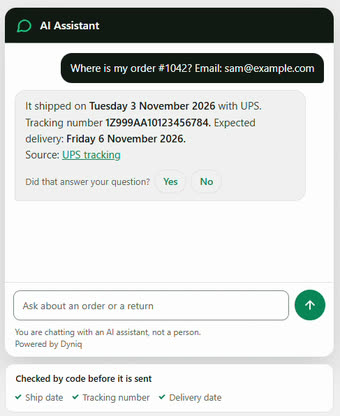
Code works out the refund amount and the return deadline from the order and your return policy. Before a reply goes out, a check in code compares the amounts, dates and tracking numbers it recognises in the reply with the order data and the store information Dyniq looked up. If one does not match, Dyniq rewrites the reply once. If the check still fails, the reply is not sent and Dyniq hands the question to your team where it can.
Policy answers list the policy they came from. Tracking answers link the carrier's own tracking page.
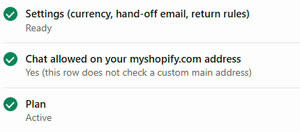
Your store cannot go live until you have approved at least one policy and no policy is left as a draft. No shopper sees a reply before you approve the plan in Shopify.
Example screens from our test store, with sample data.
7 days free, then USD 249 every 30 days.
How we worked it out. Our calculation from public price pages and app listings read 28 Oct 2026. Monthly billing, USD, excluding tax. Annual or committed plans can cost less. Vendors define their billing units differently. These are estimates, not quotes. Prices change. We assume 1,000 chats a month, of which the AI answers 400, 600 or 800, and 2 seats where a tool needs seats. For Tidio we assume that Lyro handles every conversation first and bills USD 0.50 for each one, on top of the USD 59 Growth plan, so its estimate is the same at every share. Sources: gorgias.com/pricing, zendesk.com/pricing, fin.ai/pricing, siena.cx/pricing, apps.shopify.com/yuma, tidio.com/pricing. Product names and logos belong to their owners. Dyniq is not affiliated with or endorsed by them.
I started Dyniq because store owners spend hours answering the same questions about shipping and returns.
Dyniq can answer them on your store, from your own store's information.
The trial is free. If something is unclear, email support@dyniq.ai.
J. Walker, founder of Dyniq®
FAQ
Not before you go live. The first 7 days are free. We set Dyniq up with you in test mode, and no shopper sees a reply before you approve the plan in Shopify. If you cancel in the trial, you pay nothing. After you press Go live, Dyniq answers your shoppers, also while the 7 free days run.
Your Shopify store, your policies (shipping, returns, FAQ) and 20 to 30 real past questions.
Dyniq answers policy questions from the text of your own policies. Your store cannot go live until you have approved at least one policy and no policy is left as a draft. We do not promise it up front.
We go through your results on a call. Nothing is charged until you approve the plan, and billing starts only after that.
USD 249 every 30 days, flat, setup included. Fair use is 1,000 conversations every 30 days. No per ticket, per seat or per resolution fees and no automatic overage bill.
Hours bought back = conversations x minutes per conversation / 60 x the share Dyniq can answer. Value = hours x your hourly cost. It is your numbers. It runs in your browser and nothing is sent.
No. It is an assumption you can move. Your real share depends on your questions.
No. It answers repeat shopper questions. It does not do the other work a VA does.
Yes. Cancel any time. Data export on request, by email.
A named person from our team, included in the price. We do the setup with you in the 7 free days.
Live replies, yes: after your store passes the go-live checks, including the plan in Shopify, and you press Go live, Dyniq answers your customers, also in the 7 free days, and hands the hard questions to you. Chat on your site, set up with us. You can try the Dyniq AI Demo Assistant at the bottom right of the Dyniq home page. Dyniq replies in the shopper's language. Dutch, French, German and Spanish are still in test. Other channels: not yet.
The 7-day free trial
7 days free. I set it up with you and you test it on your own customer questions. No shopper sees a reply until you approve it.
7 days free, then USD 249 every 30 days.